Discord Bot & Cloud Relay
Saba-chan Discord bot configuration and the cloud relay pairing flow that lets you control your server without port forwarding.
Discord Bot & Cloud Relay
The Saba-chan Discord bot is an official bot operated on the cloud relay server. You don't need to run a bot process or manage a Discord token yourself — just invite the official bot to your Discord server and pair it once with a code from the Saba-chan app.
1. How It Works
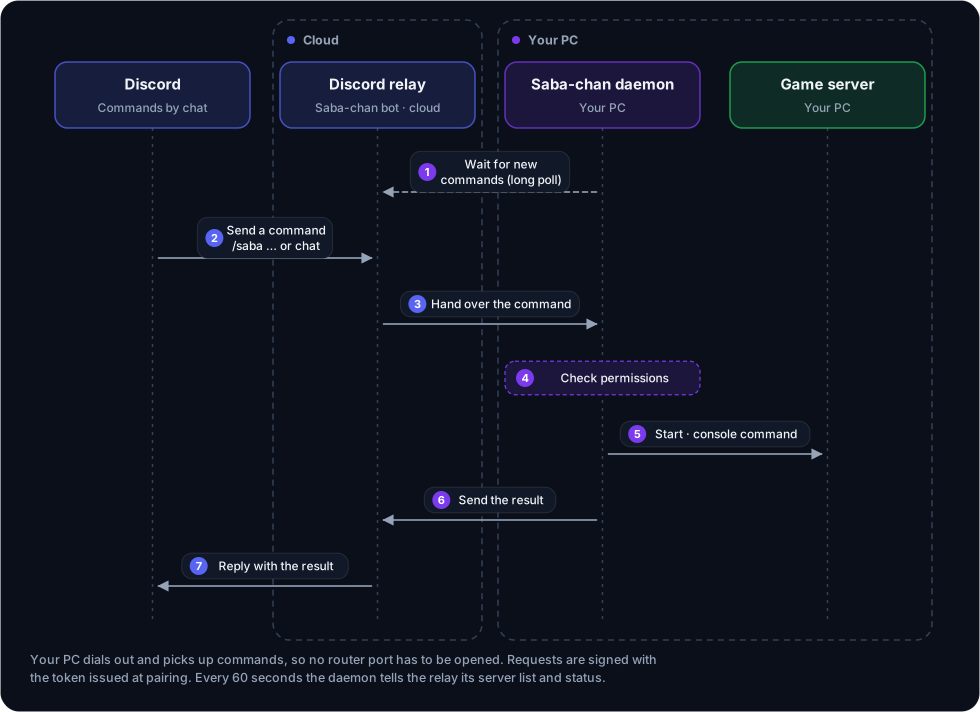
- The bot itself runs inside the relay server. Nothing bot-related is installed on your PC.
- Game servers run on your PC. The Saba-chan daemon on your PC connects out to the relay server with long-polling, fetches commands, and sends the results back.
- The daemon sends game commands to the server console (stdin). Only Palworld uses its REST API. RCON is not used.
- Daemon ↔ relay traffic is outbound HTTPS from your PC only. No router port forwarding is required.
- Music is handled on the relay side without going through your PC, so it works even when your PC is off.
2. Pairing
Pairing registers a host (the Saba-chan daemon) and nodes (Discord servers) on the relay server. It finishes with a single code entry.
2.1 Flow Diagram
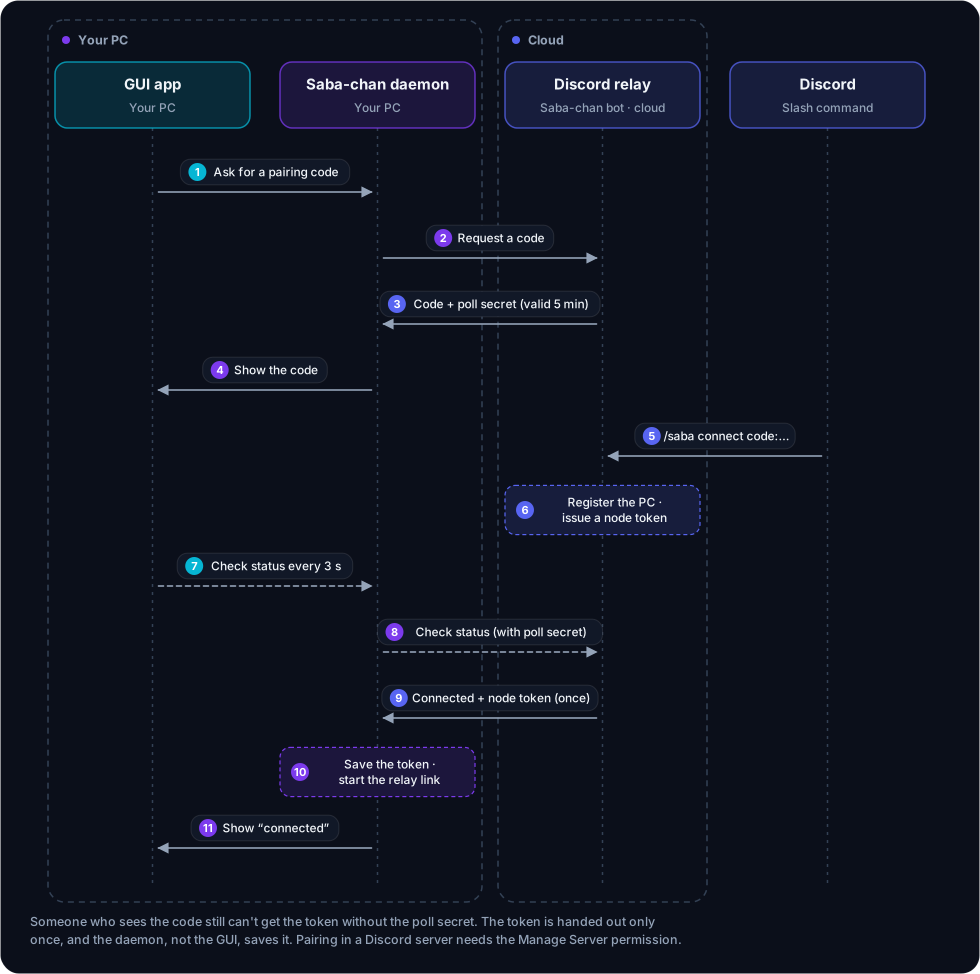
- The pairing code is 32 characters;
pollSecretis 48 characters. TTL is 5 minutes. - The token is returned exactly once (atomic swap). The daemon, not the GUI, saves it to
.node_tokenas soon as it arrives and starts the relay connection. The app passes the poll secret only to the daemon on your PC, and the daemon sends it to the relay in a header, never in the URL. - Even if someone sees your pairing code, they cannot intercept the token without the
pollSecret. - One Discord account is linked to one PC. Pairing again from another PC with the same account makes the new PC replace the old one.
2.2 App-side Steps
- In the Saba-chan app, open Discord → Connection and click Connect a Discord server.
- If the official Saba-chan bot isn't in your Discord server yet, invite it first with Invite the bot.
- The screen shows a connection code and the command to type. Click Copy and enter it in a Discord channel as
/saba connect code:<code>(the app may show the Korean name/사바쨩 연결 코드:<code>; it is the same command). - Only members with the Manage Server permission in that Discord server can run this command.
- The app checks the status every 3 seconds through the daemon and switches to "Connected" once the daemon has saved
.node_token.
Once paired, the daemon keeps a long-poll connection to the relay server automatically. If you turn off the Command relay switch in the app, your PC stops receiving Discord commands and the bot won't answer.
2.3 Connecting another Discord server without a code
If your Discord account is already paired, you can run just /saba connect (no code) in another Discord server.
- The bot sends a connection request to Saba-chan on the PC linked to your account. Accept it in Saba-chan on your PC within 10 minutes and that Discord server is connected.
- Your PC must be on. If no PC is online, the bot tells you to connect with a pairing code instead.
- As with a code, you need the Manage Server permission, and a Discord server already connected by someone else can only be moved by that server's owner.
2.4 Unpairing
- Click Disconnect in the app → the daemon stops the command relay and deletes
.node_token. This PC is disconnected from every Discord server. - To detach just one Discord server, run
/saba disconnectin that server. Only the person who connected it or the Discord server owner can use it, and the server's channel assignments are removed as well.
3. Bot Slash Commands
These are the commands under the official bot's root command. In Discord clients set to a language other than Korean, the root appears as /saba with English subcommand names; in Korean it is /사바쨩.
| Command | Who | Action |
|---|---|---|
/saba status | Anyone | Show the status of the PC connected to this server and each game server (CPU, RAM) |
/saba connect [code] | Manage Server permission | Connect with a pairing code. Leave the code empty to send a request to your PC (§2.3) |
/saba disconnect | Connector or server owner | Disconnect this server from its PC |
/saba permission grant <user> [level] | Node owner | Give a member a command level (Admin, User, Chatbot, Banned; default User) |
/saba permission revoke <user> | Node owner | Remove the member's own level and return them to the default level |
/saba permission default <level> | Node owner | Default level for members without their own level (User at first) |
/saba sleep | Node owner | Put the bot to sleep on this server (ignores all messages) |
/saba wake | Node owner | Wake the bot up |
/saba assign <Chatbot|Music|Alerts> | Node owner | Assign this channel as a chatbot channel (several, up to 20; the chatbot only talks there), the music channel (one; ordinary messages are deleted, so it asks for confirmation), or the alert channel (one; server crash, update, backup and scheduled-restart notices, plus a Restart button on crash alerts). A channel has only one kind; running the same kind again removes it. Also changeable in the app's Discord server → Channels tab |
/saba language <language> | Node owner | Language the bot replies in on this server (Auto = follow the linked app's language) |
/saba settings | Node owner | Change this server's chatbot settings (chatbot on/off, confirm before commands, web search, memory, tool packs, trigger words). Only you can see it |
/saba music bot <On|Off> | Node owner | Turn the music bot on or off for this server |
/saba music player <On|Off> | Node owner | Turn the player screen in the music channel on or off |
/saba help | Anyone | Show how to use Saba-chan and the command list (only you can see it) |
Permission, sleep, language and music settings are stored in Saba-chan on your PC, so these commands take effect while your PC is on. The same settings can be changed in the app's Discord server screen (Members, Commands, Bot settings tabs).
3.1 Per-server slash commands and the actions menu
After pairing, the bot registers extra commands in each Discord server.
/<server name> <command> [args…]— one command per game server instance, where you pick start, stop, status and the module's commands. If there are more than 25 commands, the rest go into a sub-group./actions <action> [server] [inputs…]— actions the Saba-chan app opens to Discord (server list, status, start, stop, restart, events, resource usage, backup list/create, update check/apply, and so on). The name follows the bot language (/작업in Korean). Actions that need confirmation show what will change, and the requester must press the run button. Only the node owner can apply updates.- Only instances allowed for that server appear (app's Discord server → Instances tab).
4. Chat Commands (prefix)
Once paired, you can drive servers from Discord text channels using prefix-based commands.
!saba <server> <command> [args…]
The default prefix is !saba. You can change it under Discord → General in the app; the bot picks it up at the next heartbeat (within about a minute).
<server> can be an instance name, a server alias, or a module name or alias. Commands shared by every module:
| Command | Description |
|---|---|
start | Start the server. Example: !saba minecraft start |
stop | Stop the server |
status | Query status |
Module and command aliases are set on the app's Discord → Command words screen. See the Commands document for the full command list.
5. Permission levels
Levels are Owner (3) > Admin (2) > User (1) > Chatbot (0) > Banned (-1).
- The Owner is the person who connected the server (the node owner). They can use every command and cannot be demoted.
- Each command has a risk (Safe, Caution, Danger). With the default preset the required levels are Safe = Chatbot, Caution = User, Danger = Admin. You can change the preset (Loose, Default, Strict) or set per-command levels in the app's Commands tab.
- Banned members cannot use any bot feature, including music and the chatbot.
- Requests that go through the chatbot cannot exceed the Chatbot limit (Chatbot level by default).
6. Music Features
Music playback is handled by the official music server (music-server) running alongside the relay server.
- When you run a command like
!saba music play …, the bot hands it to the music server, which streams audio into the Discord voice channel. - You don't need to install ffmpeg/yt-dlp on your PC.
- Music commands work in any channel. If you set a music channel with
/saba assign Music, you can type commands without the prefix (or just a search term) there, and a player screen is shown. - Music is on by default; turn it off with
/saba music botor in the app's Bot settings tab.
7. AI Chatbot
- The chatbot works only after you turn it on and register an API key in the app (the key is known only to your PC and the relay, never shown in Discord).
- The chatbot only talks in channels assigned with
/saba assign Chatbot. In other channels it does not answer even when called. - The chatbot can only use actions that a module or extension opens to it; anything else is refused. Lookups run right away, while actions that change something are turned into a plan first, and risky or management actions wait for someone to press a confirmation button. It never runs anything above the chatbot limit (§5).
- With the chatbot on, a chat command the daemon doesn't recognize is turned into an exact command by the chatbot and tried once more.
8. Security Model
- The daemon sends the node token from pairing (
sbn_{hostId}.{secret}) in theAuthorization: Bearerheader over HTTPS. The relay checks that token against its stored Argon2 hash. - The relay server never stores the token itself; it compares against an Argon2 hash.
- The daemon accepts no incoming connections. Game server passwords are not sent to the relay.
9. Troubleshooting
| Symptom | Cause / Resolution |
|---|---|
| Bot doesn't respond | Check the prefix (default !saba) and that there is a space after it. The bot must be in the server, pairing must be complete, and Command relay must be on in the app. Also check that the bot wasn't put to sleep with /saba sleep |
!saba … start → server not found | The first word is the server (instance name/alias or module name/alias) and the second is the command. If you run several servers of the same game, use the instance name or a server alias |
| Pairing code expired | The 5-minute TTL elapsed. Get a new code in the app |
| The app keeps waiting | Check that the /saba connect slash command was actually run and that you have the Manage Server permission |
| Discord commands don't reach the PC | Pairing again from another PC with the same Discord account disconnects the old PC. Pair this PC again |
For more detailed troubleshooting flows, see the Troubleshooting document.